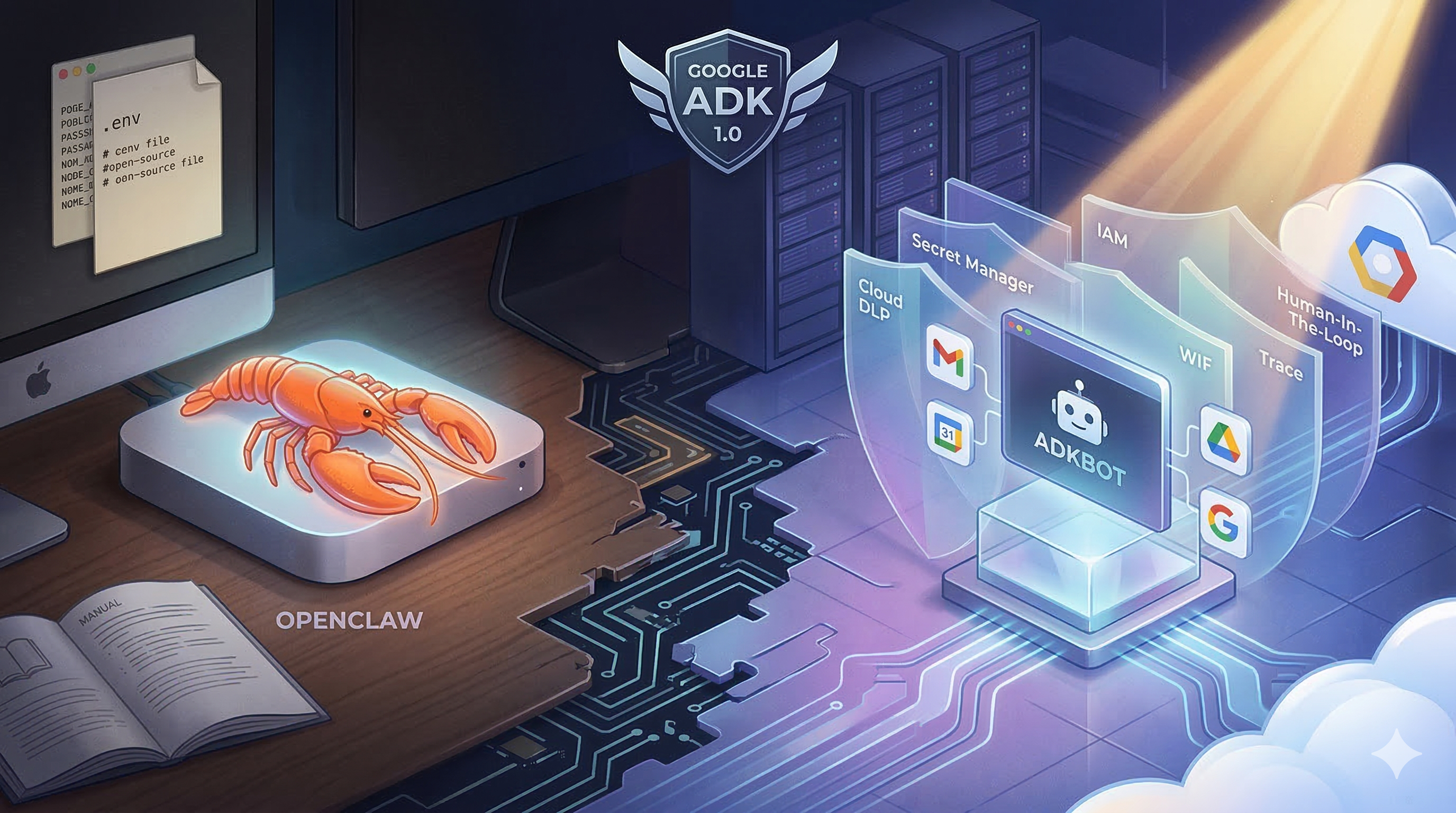
OpenClaw has had its moment in the spotlight, and a security wake-up call to go with it. The self-hosted personal AI assistant — the one Fortune called "the latest craze transforming China's AI sector" — saw its creator hired away by OpenAI, connected to 24+ messaging channels, and inspired thousands of "lobster on a Mac Mini" setups. It also, somewhat inevitably, had a supply-chain incident: malicious "skills" uploaded to ClawHub quietly targeting users' crypto wallets and credentials.
While working with Google ADK, I thought: what would OpenClaw look like if it were born cloud-native, built with enterprise security from day one, and lived entirely on GCP?
The result is AdkBot, an open-source, secure personal AI assistant built on Google's Agent Development Kit 1.0, deployed on Cloud Run, and protected by six layers of native GCP security. The repo is live; the Terraform and DLP pipeline are there now.
Status: Active build. The security infrastructure and agent orchestration are fully wired. Google Workspace integrations (Gmail, Calendar, Drive) currently return mocked data. OAuth flows for live Google Workspace access are coming next. Everything described in this article reflects the real architecture; the tools are the work in progress.
What Is OpenClaw, and Why Does It Matter?
OpenClaw is the idea that your AI assistant should live with you, not in someone else's cloud. Your context, your memory, your skills: all local. It runs on macOS, Linux, or Windows (WSL2), wakes up to a voice command, handles your Gmail, connects to 24+ messaging channels, and automates tasks via cron jobs and webhooks. No vendor lock-in. No monthly SaaS bill.
It's genuinely brilliant, and the community around it is electric. The "raise a lobster" meme — a nod to OpenClaw's logo where users place a plastic lobster on their Mac Mini as a badge of honour — is absurd and I love it.
But security is an afterthought, not a foundation. OpenClaw does have some baseline protections: DM pairing requires approval codes from unknown senders, and non-core sessions run in Docker sandboxes. But there's no DLP layer, no managed secret store, no IAM scoping. And, as we now know, a supply-chain attack vector that required zero effort to exploit.
The recent malicious crypto skill incident wasn't a freak accident; it was a predictable consequence of an ecosystem that prioritises openness and extensibility over hardening.
That gap is exactly what AdkBot explores.
So What Is AdkBot?
AdkBot is a Telegram-connected AI assistant built on Google ADK 1.0 — the same multi-agent framework Google uses internally for Agentspace and Customer Engagement Suite. It delegates tasks to four specialised subagents (Gmail, Calendar, Drive, Web Search), runs on Cloud Run, and is secure by default with six layers of protection baked in at the infrastructure level.
Think of it as OpenClaw's cloud-native, security-first cousin.
What it does (same as OpenClaw):
- Reads and searches your Gmail inbox
- Manages Google Calendar events (with human approval before anything is created)
- Searches Google Drive
- Runs web searches
- Remembers your conversations across sessions (Vertex AI Memory Bank)
What it does differently:
| Capability | OpenClaw | AdkBot |
|---|---|---|
| Where it runs | Local (your hardware) | Cloud Run (GCP) |
| Security model | Manual / community packages | 6-layer enterprise hardening |
| Agent framework | Custom / LLM routing | Google ADK 1.0 (multi-agent) |
| PII protection | None by default | Cloud DLP pre-filters every message |
| Secret management | .env files | GCP Secret Manager |
| Memory | Local | Vertex AI Memory Bank (persistent, cross-session) |
| Deployment | Local install | Terraform + GitHub Actions (WIF) |
| Cost | Hardware (Mac Mini ~£600) | ~$0–$5/month for personal use* |
| Interface | 24+ messaging channels | Telegram |
| Extensibility | 24+ channels, cron, webhooks, companion apps | Focused: 4 GCP-native subagents, extendable via ADK |
The Architecture
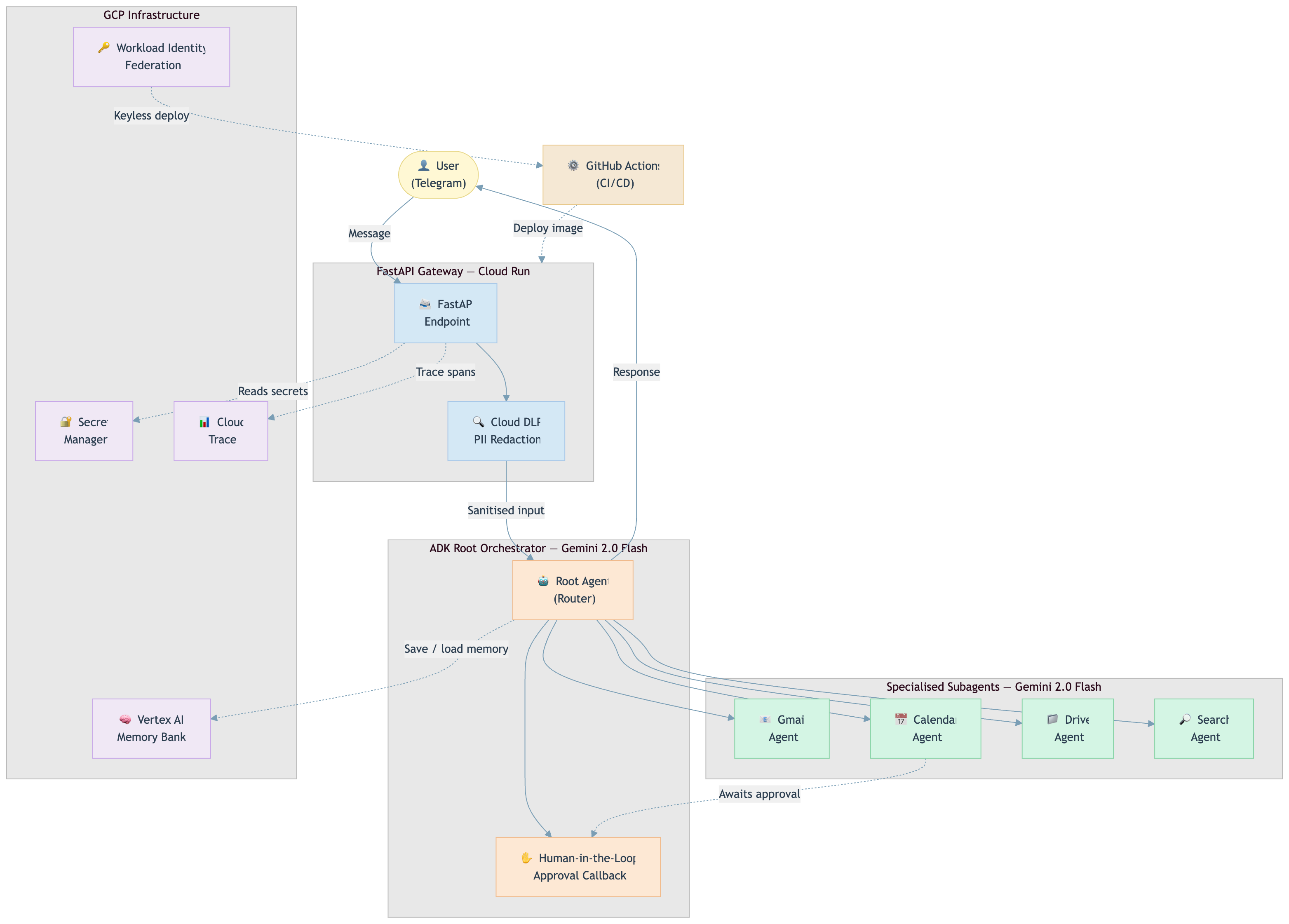
AdkBot is a root orchestrator + four specialised subagents, all running on Gemini 2.0 Flash. A FastAPI gateway receives Telegram messages, runs them through Cloud DLP for PII scrubbing, hands off to the ADK root agent, which routes to the right subagent, and returns the response. Cloud Trace records every hop.
Telegram Message
     │
     ▼
FastAPI Gateway (Cloud Run)
     │
     ├─ Cloud DLP (PII scan & redact)
     │
     ▼
ADK Root Orchestrator (Gemini 2.0 Flash)
     │
     ├─── GmailAgent     → read_inbox, search_emails, read_email
     ├─── CalendarAgent  → list_events, create_event [human approval required]
     ├─── DriveAgent     → search_files, read_file
     └─── SearchAgent    → web_search
     │
     ▼
Vertex AI Memory Bank (memory) + Cloud Trace (observability)
     │
     ▼
Telegram Response
Memory is handled by Vertex AI Memory Bank — Google's managed vector store for agents — rather than a hand-rolled Firestore schema. Conversations persist across sessions, context survives restarts, and retrieval is semantic rather than exact-match string lookup.
Everything is provisioned with Terraform. Deployment is keyless via Workload Identity Federation. No service account keys ever touch GitHub Actions.
Cost Note: For personal use (hundreds of messages/day), you'll stay comfortably within free-tier or near-zero costs. Cloud DLP, Vertex AI Memory Bank, and Gemini API calls via Vertex AI all accrue if you exceed free-tier thresholds, but those thresholds are generous for personal workloads. At enterprise scale, costs climb accordingly. Free for a personal assistant; priced for a product.
The Six Security Layers (This Is the Real Story)
This is where AdkBot earns its "secure by default" tagline. None of these are bolt-ons; they're all native GCP services wired together from the start.
1. Cloud DLP PII Filtering
The LLM never sees raw PII. Every incoming message is scanned before it reaches the model. Credit card numbers, SSNs, phone numbers are redacted automatically at the gateway.
2. Secret Manager
Zero .env files in production. Every credential (Telegram token, Gemini API key, OAuth secrets) lives in Secret Manager and is injected at runtime. Nothing sensitive is ever in the codebase or container image.
3. IAM Least Privilege
The agent can't hurt itself. The Cloud Run service account has exactly the permissions it needs and nothing more. It cannot modify IAM, cannot access Secret Manager beyond its own secrets, cannot touch the Terraform state.
4. Human-in-the-Loop
Nothing destructive runs without your tap. When you ask AdkBot to create a calendar event, execution pauses. Telegram sends you a message with two inline buttons: ✅ Approve and ❌ Reject. The agent waits. Only after you tap Approve does it proceed — at which point ADK resumes the paused execution from exactly where it left off.
This is a first-class callback in ADK's orchestration model, not a polling loop bolted on after the fact.
5. Workload Identity Federation
No long-lived keys, anywhere. CI/CD deployments via GitHub Actions are keyless. WIF tokens are short-lived and scoped to the specific repo and branch. Compromise one token, and you've gained nothing reusable.
For a deep dive on WIF implementation, see my article: Implementing Zero-Trust Multi-Cloud: A Complete WIF Setup Guide.
6. Cloud Trace
Full visibility across every agent hop. You can see exactly what the root orchestrator delegated, how long the DLP scan took, and where latency lives. This is table stakes for production; most hobby agents skip it entirely.
Why ADK 1.0 Changes the Game
ADK launched at Google Cloud NEXT 2025, and it's genuinely different from LangChain or AutoGen. It's the framework Google built for themselves to power Agentspace — with the same orchestration logic and multi-agent patterns — now open-source under Apache 2.0.
The key difference from a LangChain Router:
In LangChain, a router is essentially a prompt that picks a tool from a list. The "agents" sharing that router share context, share state, and often bleed into each other.
In ADK, the root orchestrator delegates to fully independent agents, each with its own system prompt, its own tool registry, and its own execution context. The GmailAgent has no visibility into what the CalendarAgent is doing. There's no shared mutable state to corrupt, and no way for a poorly-scoped tool to accidentally affect another agent's operation.
This matters for security as much as it does for reliability. Least-privilege isn't just an IAM concept; it applies at the agent level too.
What else makes ADK interesting:
- Built-in Human-in-the-Loop: Approval flows are a first-class callback, not a polling hack bolted on top
- ADK Web UI: Run
adk weband get a local dev interface to test agent flows without Telegram. Invaluable for iteration - Model-agnostic: Optimised for Gemini but works with Anthropic, Mistral, LLaMA via LiteLLM
For someone with a GCP Pro Architect background, building with ADK felt like coming home. Cloud Run, Secret Manager, Trace: all familiar primitives, now assembled in service of an agent rather than a traditional backend.
What This Isn't (Honest Caveats)
AdkBot is a demonstration repo, not a production assistant. The Gmail, Calendar, and Drive tools are currently mocked; they return realistic fake data rather than live API calls. The real OAuth integration is the next phase of the build.
It also deliberately doesn't try to replicate OpenClaw's breadth. Fifty integrations and a companion iOS app are not the point. The point is: here's what a minimal, secure, cloud-native agent looks like using the newest Google tooling. You can extend it.
What's Next
The repo is actively being built. Coming soon:
- Live Gmail OAuth integration (replace mocked tools)
- Proactive scheduling via Cloud Scheduler (cron-style reminders)
- Agent evaluation using ADK's built-in eval framework
- A companion article going deep on the DLP + Human-in-the-Loop implementation
⭐ Star the repo on GitHub — the Terraform modules, Cloud Run config, and DLP pipeline are all there now. If you're an infrastructure person, the IaC is often the most instructive part. Live Workspace integrations are landing next; starring is the best way to follow along. Issues and PRs welcome.
The Bigger Picture
OpenClaw is the right idea with an incomplete risk model. Local-first is powerful, and the DM pairing and Docker sandboxing show awareness of the problem. But awareness isn't the same as defence-in-depth. The supply-chain incident wasn't unusual; it's the predictable outcome when a fast-growing ecosystem prioritises extensibility without a hardened baseline for what extensions can do.
ADK 1.0 gives us a clean slate to build differently. Not because GCP is inherently safer, but because when your defaults are Secret Manager, DLP, IAM, and WIF, the secure path is also the easy path.
That's the principle I try to carry across everything I build: security as an architectural decision, not an afterthought.
If you're experimenting with ADK or building your own personal assistant, I'd love to compare notes. Drop a comment, find me on LinkedIn, or follow along on Medium, where the next piece will go deep on the DLP + Human-in-the-Loop implementation.



Also published on Medium - Join the discussion in the comments!