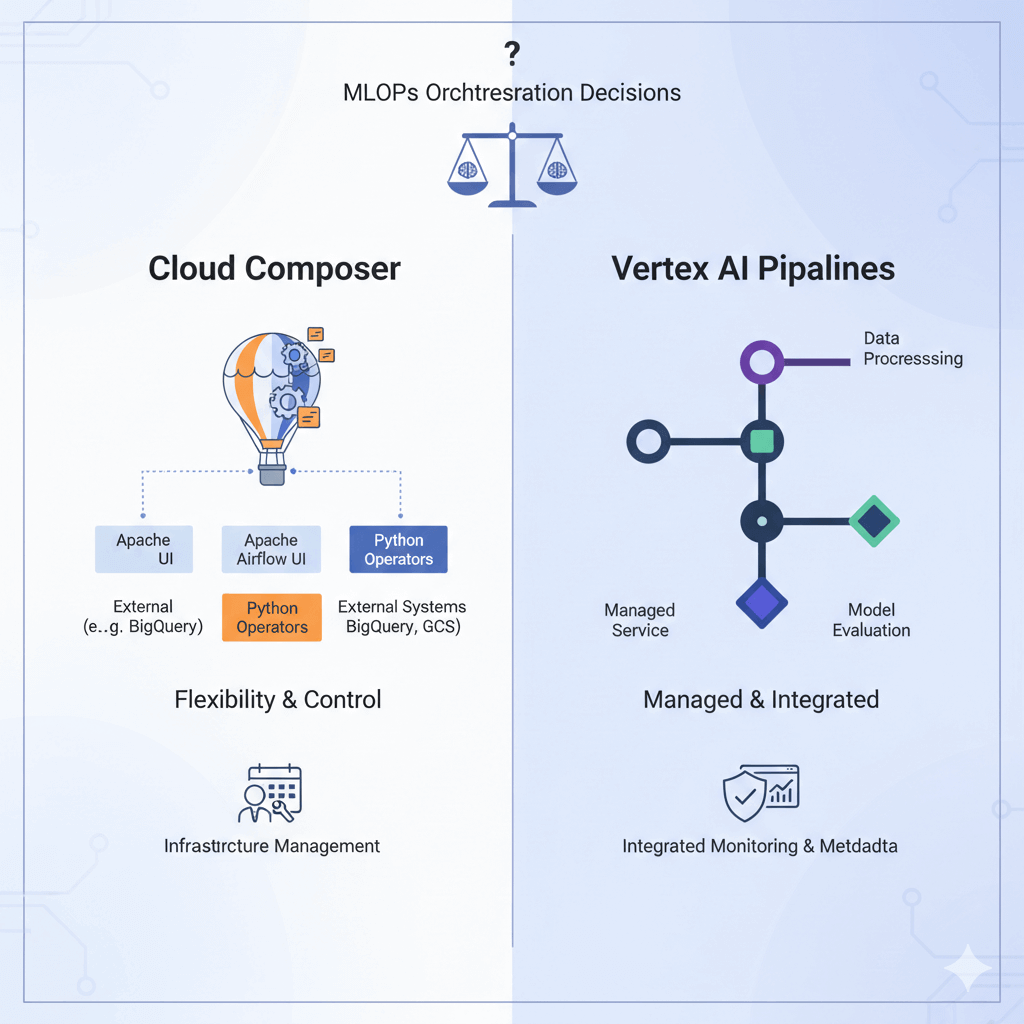
Your team just got budget approval for MLOps infrastructure. The architect recommends Cloud Composer for large-scale data ingestion to support your new Gemini model fine-tuning pipeline. The ML engineers want Vertex AI Pipelines for experiment tracking and model evaluation. The data engineers are confused. Sound familiar?
This internal debate is one of the most common and critical crossroads in building a modern ML platform on Google Cloud. The stakes are high. The wrong choice can lead to six months of technical debt, frustrated teams, and a platform that fights your workflow instead of enabling it. The right choice, however, lays the foundation for a scalable, maintainable ML system for years to come.
Too often, this decision is made based on team familiarity or feature-list buzzwords, not a clear-eyed assessment of actual needs. This article provides a practical decision framework that prioritises team skills, data complexity, and long-term budget—helping you move beyond the hype to an architecture that truly fits.
Companion Resources: Full working examples and Terraform configurations available at github.com/sonikajanagill/composer-vs-vertex-ai-pipelines
The Enterprise Dilemma
Choosing between Cloud Composer and Vertex AI Pipelines is about more than just picking a tool; it's a fundamental decision that will shape your engineering culture, team dynamics, and operational efficiency.
Why This Decision Matters
The tool you select becomes the backbone of your data and ML operations. Cloud Composer, as a managed Apache Airflow service, brings powerful, general-purpose workflow orchestration. Vertex AI Pipelines, a fully managed Kubeflow Pipelines (KFP) service, offers a native, ML-centric environment.
Migration costs can be 10x the initial setup, involving not just technology but retraining teams and re-architecting processes. Developer experience and skill-set alignment prove more critical than raw feature completeness.
Common Decision Patterns (Good and Bad)
✘ Comfort-First: "We know Airflow, so Composer" ignores ML-specific needs, leading to custom experiment tracking development.
✘ Feature-First: "ML team wants Vertex AI" backfires when most work involves complex data engineering outside the Vertex AI ecosystem.
✔ Requirements-First: Match tool capabilities to actual workflow complexity—data plumbing vs. ML experimentation.
Generative AI integration on Vertex AI
The landscape has evolved dramatically with the rise of large language models:
| Capability | Cloud Composer | Vertex AI Pipelines |
|---|---|---|
| Gemini Integration | Custom operators required | ✔ Native Gemini components |
| RAG Pipelines | Manual implementation | ✔ Pre-built RAG components |
| Vector Embeddings | External orchestration | ✔ Built-in Vertex AI Vector Search |
| LLM Fine-tuning | Custom workflow design | ✔ Integrated tuning pipelines |
| Multi-modal AI | Complex DAG orchestration | ✔ Native multi-modal support |
For teams building LLM applications in 2025, Vertex AI Pipelines offers significant architectural advantages through native integration with Gemini, Vector Search, and Foundation Models.
Composer's Sweet Spot: Macro Pipeline Domain
Cloud Composer is your go-to choice for macro-orchestration—managing complex, multi-system workflows where ML is just one part of a larger business process.
When Composer Excels
- Complex Data Orchestration: Composer shines when your pipeline is a symphony of diverse systems. This includes integrating legacy on-premises databases with cloud services, managing dependencies on external APIs, blending ML workloads with traditional ETL or business intelligence tasks, and building robust, auditable regulatory compliance workflows.
- Team Profile Match: Composer is a natural fit if your team has strong data engineering chops, existing Airflow knowledge, a culture of infrastructure-as-code (e.g., Terraform), and relies heavily on SQL and scripting for data processing.
- Architecture Patterns: Typical patterns include orchestrating the entire flow from a data lake to a feature store, then triggering a model training job. It's ideal for batch-processing-heavy environments and scenarios requiring extensive coordination with external systems for governance and compliance.
Implementation Example
The following DAG (Directed Acyclic Graph) snippet illustrates how Composer acts as the central conductor, handling data extraction, quality checks, and finally triggering a specialised ML pipeline on Vertex AI.
# Composer DAG structure for enterprise ML
from airflow import DAG
from airflow.operators.bash import BashOperator
from airflow.operators.python import PythonOperator
from airflow.providers.google.cloud.operators.vertex_ai.custom_job import CreateCustomTrainingJobOperator

dag = DAG('enterprise_ml_pipeline', schedule_interval='@weekly')

# Data extraction and validation pipeline
extract_sources = BashOperator(task_id='extract_multi_source_data',
                            bash_command='gsutil -m cp gs://data-lake/* gs://staging/', dag=dag)
validate_data = PythonOperator(task_id='validate_data_quality',
                            python_callable=validate_schema_and_quality, dag=dag)

# Trigger specialised ML pipeline
trigger_vertex_training = CreateCustomTrainingJobOperator(
    task_id='start_vertex_ai_pipeline',
    staging_bucket='gs://your-bucket/staging',
    display_name='ml-training-pipeline',
    container_uri='us-docker.pkg.dev/your-project/ml-trainer:latest',  # Updated to Artifact Registry
    machine_type='e2-standard-4',  # Updated machine type
    replica_count=1,
    dag=dag
)

# Define task dependencies
extract_sources >> validate_data >> trigger_vertex_training
Reference: CreateCustomTrainingJobOperator.
Cost & Performance Reality
From my experience with enterprise deployments:
- Setup Complexity: Medium - while Airflow infrastructure is managed, designing robust DAGs requires careful planning and testing.
- Ongoing Maintenance: Low operational overhead since Google manages the underlying infrastructure, but your team owns DAG code, dependency management, and scaling configurations.
- Cost Structure: Predictable monthly costs starting around $200–500 for small environments. This makes it suitable for always-on workflows where you need consistent orchestration capability.
- Learning Curve: Steep for teams without Airflow experience, but manageable for seasoned data engineers who understand workflow orchestration concepts.
Vertex AI Pipelines' Sweet Spot: Micro Pipeline Domain
Vertex AI Pipelines specialises in micro-orchestration of machine learning workflows with deep, native understanding of ML concepts.
When Vertex AI Pipelines Excels
- ML-Native Workflows: Built-in experiment tracking, model versioning, hyperparameter optimisation, and A/B testing infrastructure.
- Team Profile Match: ML Engineers and Data Scientists with Python-first culture, containerisation comfort, rapid research-to-production focus.
- Architecture Patterns: Feature engineering → training → evaluation → deployment loop, experiment-heavy environments, component reusability priority.
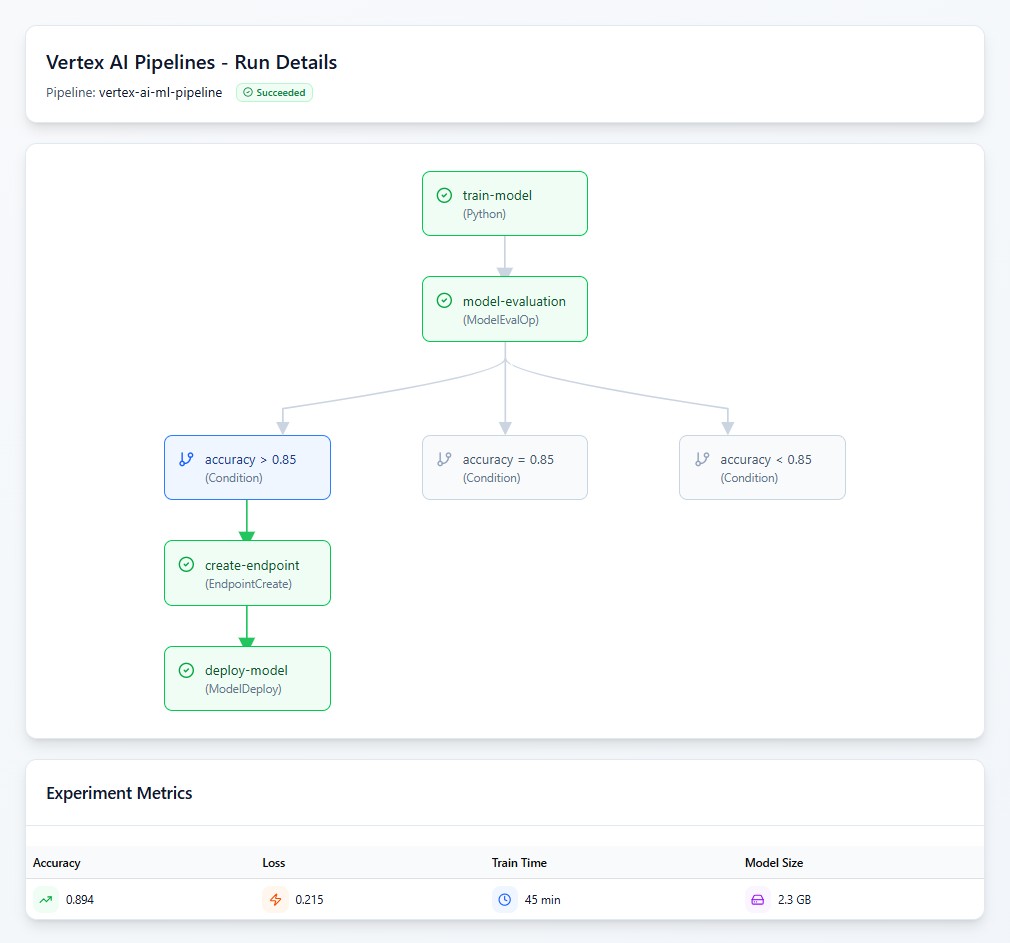
It's crucial to understand that Vertex AI Pipelines is Kubeflow Pipelines (KFP) fully managed by Google. You get the full power and flexibility of KFP for defining complex ML workflows, with all the Kubernetes operational overhead completely abstracted away.
Implementation Example
This Python code defines a pipeline component and orchestrates a full ML lifecycle, leveraging built-in Vertex AI components for evaluation and deployment.
from kfp import dsl
from google.cloud.aiplatform import PipelineJob
from google_cloud_pipeline_components.v1.model_evaluation import ModelEvaluationOp

@dsl.component(base_image="us-docker.pkg.dev/vertex-ai/training/tf-gpu.2-13:latest")
def train_model(dataset_path: str, model_output_path: str, hyperparameters: dict) -> tuple[str, float]:
    """Train ML model with native Vertex AI experiment tracking"""
    from google.cloud import aiplatform

    with aiplatform.start_run(run="training-run") as run:
        model = train_with_vertex_ai(dataset_path, hyperparameters)
        accuracy = evaluate_model(model)

        # Native experiment tracking
        run.log_metrics({"accuracy": accuracy, "loss": model.loss})
        run.log_params(hyperparameters)

        model_resource = aiplatform.Model.upload(
            display_name="ml-model",
            artifact_uri=model_output_path,
            serving_container_image_uri="us-docker.pkg.dev/vertex-ai/prediction/tf2-gpu.2-13:latest"
        )
    return model_resource.resource_name, accuracy

@dsl.pipeline(name="ml-training-pipeline")
def ml_pipeline(dataset_path: str, hyperparameters: dict):
    train_task = train_model(dataset_path=dataset_path, hyperparameters=hyperparameters)

    # Built-in evaluation with zero configuration
    eval_task = ModelEvaluationOp(
        project="your-project",
        model=train_task.outputs["model_resource_name"],
        target_field_name="target",
        prediction_type="classification"
    )
Reusable Components: The @dsl.component decorator creates a containerised, reusable pipeline step with explicit input/output typing. This enables team collaboration, reusability across pipelines, and component versioning. Reference: https://cloud.google.com/vertex-ai/docs/pipelines/build-pipeline.
Native Vertex AI Integration: Built-in Vertex AI components deliver zero-config evaluation, managed infrastructure, experiment integration, and production readiness with built-in model governance. Reference: https://cloud.google.com/vertex-ai/docs/pipelines/gcpc-list.
Cost & Performance Reality
Based on projects I've worked on:
- Setup Complexity: Low - you define pipelines in Python and submit them. No cluster provisioning or infrastructure management required.
- Ongoing Maintenance: Very low since Google manages the underlying Kubernetes infrastructure. You only maintain pipeline and component definitions.
- Cost Structure: Pay-per-use model with approximately $0.03 per pipeline run plus compute costs. This can be significantly cheaper for sporadic training jobs, but costs add up with frequent experimentation.
- Learning Curve: Moderate - the barrier is conceptual (understanding components, pipelines, and containerisation) rather than infrastructural.
Comprehensive Decision Framework
Based on my experience across different team compositions:
Team Skill and Cost Considerations
| Skill Area | Cloud Composer | Vertex AI Pipelines |
|---|---|---|
| Data Engineering | ✔ Airflow expertise advantage | ⚠ New concepts to learn |
| ML Engineering | ⚠ Limited native ML features | ✔ Native Vertex AI integration |
| Python Development | ✔ DAG development skills | ✔ Component development skills |
| Infrastructure Management | ⚠ DAG dependency management | ✔ Fully managed simplicity |
| Generative AI/LLMs | ✘ Manual integration required | ✔ Native Gemini components |
| Security & Compliance | ✔ Full audit trail control | ✔ Built-in governance features |
Cost Reality Check
Small Teams (2–5 engineers): Vertex AI Pipelines typically offer better cost efficiency due to a pay-per-use model, especially for experimental workloads.
Medium Teams (5–15 engineers): Costs become more comparable; tool choice should focus on team skills and workflow complexity.
Large Teams (15+ engineers): Hybrid approaches often provide the best balance, using each tool for its strengths.
Cost estimates based on personal experience with enterprise deployments and publicly available Google Cloud pricing.
Security Considerations
Both platforms provide enterprise-grade security, but with different approaches:
- Identity & Access Management:
- Composer: Granular DAG-level permissions, manual service account management
- Vertex AI Pipelines: Component-level IAM with automatic service account propagation
- Network Security:
- Composer: Full control over VPC configuration and custom networking
- Vertex AI Pipelines: Managed VPC with automatic private endpoint setup
- Audit & Compliance:
- Composer: Complete task lineage through Cloud Logging, custom audit implementations
- Vertex AI Pipelines: Built-in ML governance and automatic artifact lineage
Migration Strategies & Performance Benchmarks
Migration Approaches
From Composer to Vertex AI Pipelines: In my experience, this migration typically takes 2–4 months, depending on DAG complexity. The main challenges involve:
- Converting Python operators to containerised components
- Migrating custom experiment tracking to Vertex AI Experiments
- Retraining teams on KFP concepts
From Vertex AI Pipelines to Composer: This path is more complex (3–6 months) because you're moving from managed simplicity to infrastructure management:
- Building custom operators for ML components
- Implementing experiment tracking systems
- Setting up proper DAG orchestration for component dependencies
Common Troubleshooting Patterns
Composer Issues I've Encountered:
- DAG Import Failures: Usually due to missing dependencies or import errors
try:
    from airflow.providers.google.cloud.operators.vertex_ai import CreateCustomTrainingJobOperator
except ImportError as e:
    logging.error(f"Missing dependency: {e}")
raiseVertex AI Pipelines Common Problems:
- Component Definition Errors: Often missing type annotations or improper input/output specifications
# ✘ Missing type hint
@dsl.component
def bad_component(data):
    return process_data(data)

# ✔ Proper typing
@dsl.component
def good_component(data: str) -> str:
return process_data(data)Hybrid Architecture Implementation
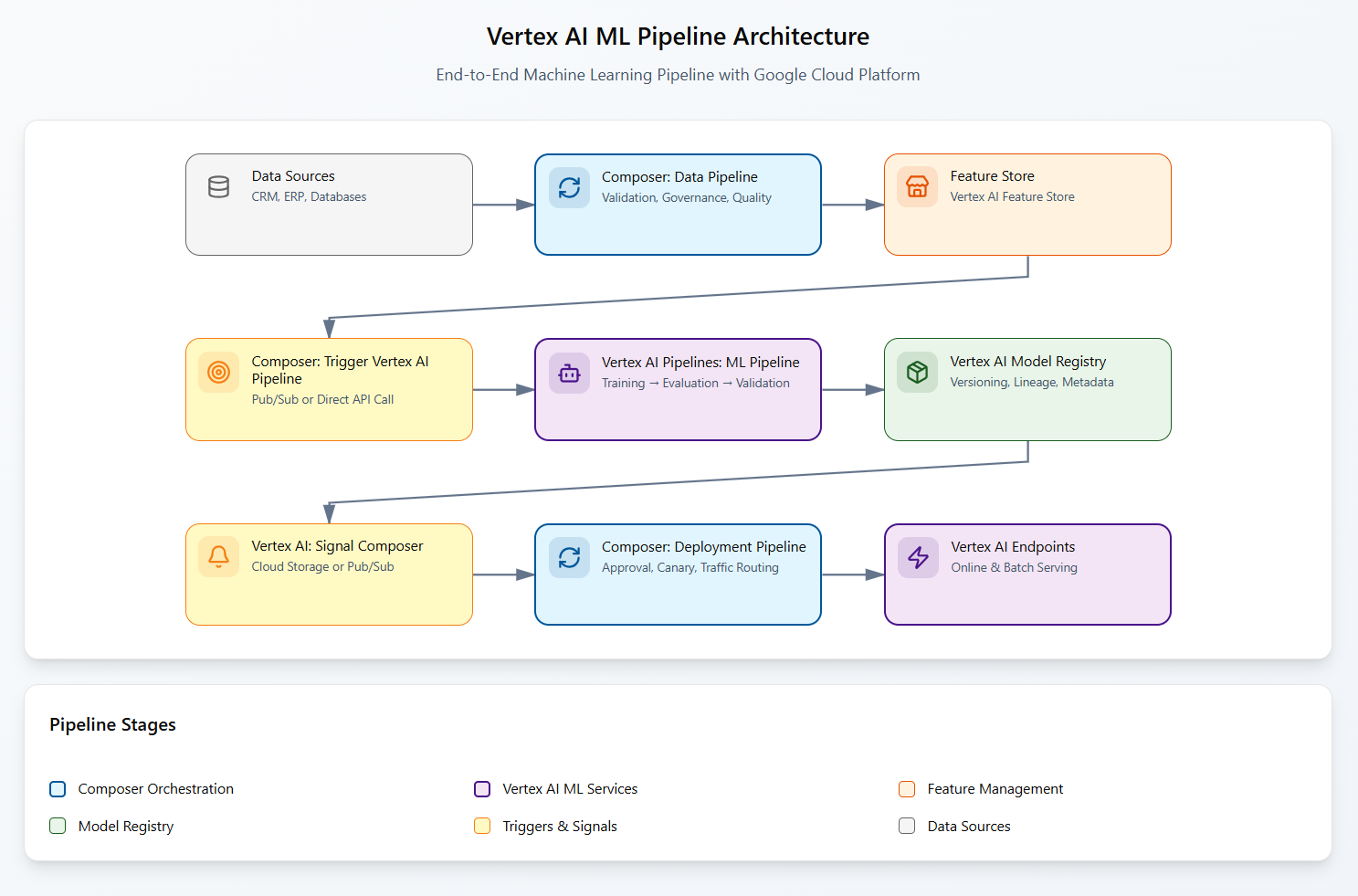
For enterprises requiring both macro and micro orchestration, a hybrid approach leverages each tool's strengths through clear service boundaries.
Implementation Pattern
# Composer DAG triggers Vertex AI Pipeline
from airflow.providers.google.cloud.operators.vertex_ai.pipeline_job import CreatePipelineJobOperator

trigger_ml_pipeline = CreatePipelineJobOperator(
    task_id="trigger_vertex_pipeline",
    display_name="ml-training-workflow",
    template_path="gs://your-bucket/pipeline.json",
    parameter_values={
        "dataset_path": "{{ task_instance.xcom_pull(task_ids='data_validation') }}",
        "model_name": "recommendation-model-{{ ds }}"
    },
    dag=dag
)

# Vertex AI Pipeline signals back via Cloud Storage
@dsl.component
def signal_completion(model_uri: str, accuracy: float):
    """Signal pipeline completion back to Composer"""
    import json
    from google.cloud import storage

    client = storage.Client()
    bucket = client.bucket("pipeline-coordination")
    blob = bucket.blob("ml-pipeline-complete.json")

    result = {
        "model_uri": model_uri,
        "accuracy": accuracy,
        "timestamp": datetime.utcnow().isoformat(),
        "status": "completed"
    }
    blob.upload_from_string(json.dumps(result))
The hybrid architecture follows this flow:
Cost Optimisation Strategy
From enterprise implementations I've observed:
- Predictable Base Costs: Use Composer for always-on data workflows ($400-600/month baseline)
- Variable ML Costs: Leverage Vertex AI Pipelines for experiment-heavy workloads (pay-per-use scaling)
- Total Cost Optimisation: 40-60% cost reduction vs. single-tool approaches in enterprise scenarios
Real-World Case Studies
Case Study 1: E-commerce Recommendation (Hybrid Success)
- Architecture: Composer for data orchestration + Vertex AI for ML experimentation
- Outcome: 40% faster ML iteration, 60% infrastructure cost reduction
- Key Lesson: Service boundary separation enabled independent team scaling
Case Study 2: Financial Compliance (Composer-Only)
- Architecture: End-to-end Airflow DAGs for audit trail requirements
- Outcome: Complete regulatory compliance, simplified audit processes
- Key Lesson: Regulatory constraints often override technical preferences
Case Study 3: Healthcare AI (Research-to-Production Pipeline)
- Architecture: Vertex AI for research, Composer for production deployment
- Outcome: 10x faster research iteration, robust production reliability
- Key Lesson: Different phases of ML lifecycle benefit from specialised tools
Implementation Decision Checklist
Quick Decision Tree
Red Flags
- Avoid Composer if: ML-heavy team, experiment tracking critical, native Vertex AI integration required
- Avoid Vertex AI Pipelines if: Limited Python ML skills, extensive non-Google integrations, complex business process orchestration
- Consider Hybrid if: Clear separation between data/business logic and ML experimentation
Strategic Implementation Approach
The Generative AI Reality
With the rapid evolution of LLMs and multimodal AI, Vertex AI Pipelines has gained significant strategic advantage through native integration with Google's AI ecosystem. Teams building on Gemini, RAG, or advanced AI applications should strongly consider this path.
Implementation Strategy
- Start with Primary Pain Point: Address your biggest workflow challenge first
- Plan for Evolution: Both tools can coexist; start simple, scale strategically
- Measure Outcomes: Track developer velocity, cost efficiency, and team satisfaction
- Embrace Hybrid: Most enterprises benefit from specialised tools for specialised problems
Success Metrics That Matter
- Developer Velocity: Idea to production timeline
- System Reliability: Pipeline success rates >95%
- Cost Efficiency: Total ownership cost per model
- Team Adoption: Active usage rates >80%
Remember: The best architecture is the one your team actually uses and maintains successfully. Technical elegance means nothing if it's abandoned after six months.
Coming Next:
"Multi-Cloud Data Access: Workload Identity Federation Patterns" - diving deep into enterprise security architecture for MLOps.



Also published on Medium - Join the discussion in the comments!