
Recently, a computer science student accidentally committed their Google Cloud service account key to a public GitHub repository. Within hours, malicious bots—constantly scanning for exactly this kind of mistake—discovered it and spun up cryptocurrency mining operations. The bill: $55,000 before the student even woke up (Ref). This is the reality of MLOps security when cloud credentials and cloud secrets are managed through static service account keys instead of modern multi-cloud authentication solutions like Workload Identity Federation.
But the bill wasn't even the worst part.
When I first read about this incident, two things struck me:
First, the attack speed. Hours, not days. The automation on both sides (malicious bots vs. cloud infrastructure) meant the damage compounded before any human intervention was possible.
Second, the remediation complexity. In my implementations across systems, I've seen how credentials proliferate: GitHub Actions variables, AWS Secrets Manager, local dev machines, test containers. When I asked, "Where are all your GCP service account keys?" the answer is always uncertain: "Everywhere."
The problem is widespread:
- Developers exposed 23.8 million secrets on public GitHub repositories in 2024 alone—a significant 25% year-over-year increase from the previous year's figures. (GitGuardian)
- 65% of Forbes AI 50 companies had leaked verified secrets on GitHub (Wiz Exposure Report 2025)
- Average cost per data breach: $4.44 million (IBM Security Report 2025)
This problem isn't just a technical annoyance; it's a strategic failure. Let's talk about why the traditional approach to multi-cloud access is broken.
There's a way to eliminate secrets entirely.
Not hide them.
Not rotate them.
Eliminate them.
Empowering your team to improve security and operational efficiency. Let me show you what that looks like.
The Multi-Cloud Reality: Your Data Lives Everywhere
After transitioning from WebSphere Commerce to modern cloud-native ML, I can tell you: the "pure single-cloud" architecture is a fantasy. The reality is messy, organic, and entirely predictable.
Pattern observed across industry:
- Training Data: 2TB in AWS S3 (legacy data lake, 10 years old)
- Feature Engineering: Azure Databricks (acquired the company's infrastructure)
- Model Training: Vertex AI AutoML (GCP, best-in-class for your use case)
- Inference: On-premise Kubernetes (latency requirements, regulatory constraints)
According to Gartner, 92% of enterprises operate in multi-cloud environments. From my implementations, that number feels conservative. The challenge isn't migrating everything to one cloud (unrealistic). The challenge is connecting them securely.
Migration timeline to single-cloud? 18+ months, $2M+ in engineering costs.
Time to secure this with Workload Identity Federation? 2 days.
That's the difference we're talking about.
The "Traditional" Approach: A $450K Security Nightmare
When faced with this multi-cloud reality, most teams reach for the tool they know: The Service Account Key.
I call this the "Download and Pray" pattern. In my WebSphere days, we did something similar with database credentials—storing them in WebSphere variables and property files. It was painful then with 20 passwords across an enterprise platform.
In cloud-native ML? I've watched this pattern multiply by 50.
Here's what I've observed across every implementation:
1. ✓ Create a GCP Service Account.
2. ✓ Download the JSON key file (the "skeleton key").
3. ✓ Upload it to AWS Secrets Manager (or worse, a `.env` file).
4. ✓ Distribute it to 47 microservices via Kubernetes secrets.
5. ✓ *Try* to remember to rotate it every 90 days.
6. ✓ Patch CI/CD pipelines when rotation breaks them
7. ✓ Pray nobody commits the key to GitHub
8. ✓ Repeat for Azure, GitHub Actions, on-prem...
This approach isn't just common—it's nearly universal. I've yet to meet an engineering team that hasn't started here. The question is how quickly they realise it doesn't scale.
1. The Financial Cost
For a mid-size e-commerce ML project (recommendation engine, 20M users):
- 47 service account keys across AWS, GCP, and Azure
- AWS Secrets Manager cost: $0.40/secret/month × 47 = $18.80/month
- Azure Key Vault cost: $0.03/10K operations ≈ $4/month
- Google Secret Manager: $0.06/secret/month × 12 = $0.72/month
- Total storage: ~$282/year
That's just storage. The hidden costs:
- Quarterly rotation: 8 hours × 4 = 32 hours/year
- "Expired key" incidents: 2-3 per quarter, each requiring 4-6 hours
- Total management overhead: ~60 hours/year per project
At a $150/hour engineering rate, that's $9,000/year in management overhead alone—33x the storage cost.
And this was a well-run project. I've seen much worse.
2. The Operational Risk
Static keys break. The operational risk is real and predictable. In security forums and engineering communities, I regularly see post-mortems following this pattern:
- Production pipeline down 2-6 hours
- Root cause: expired credentials
- Contributing factor: rotation calendar missed, the engineer left the company, the manual process failed
- Impact: revenue loss, customer trust damage, and an emergency all-hands
During my implementations, preventing these incidents became a primary design goal. The question wasn't "if" rotation would fail, but "when."
In one of my recent projects using LangChain and RAG in GitHub Actions-to-GCP flows, an expired key halted embedding generation, costing us 4 hours of crunch time. That's why preventing these has become a non-negotiable in my pipelines.
3. The Security Liability
This is the most critical vulnerability. A static key remains valid until explicitly revoked. If it leaks, it grants access to anyone, anywhere, forever—and discovering a leak often takes days or weeks. In an era of automated scrapers and AI-driven cyberattacks, relying on a static file is like leaving your front door key under the mat—and posting your address on the internet.
Where Keys Hide (And Leak):
- 🔴 GitHub commits - Even deleted files remain in git history
- 🔴 CI/CD logs - Accidentally printed during debug sessions
- 🔴 Local machines - 47 developer laptops are 47 attack vectors
- 🔴 Container images - Keys baked in during development
- 🔴 Third-party services - Logging platforms, monitoring tools
Each additional location multiplies the attack surface. Each location is a potential breach.
Workload Identity Federation eliminates all of them.
Workload Identity Federation: The Zero-Trust Solution
So, if static keys are the problem, what is the solution?
Stop using them.
This is where Workload Identity Federation (WIF) changes the game. WIF allows you to eliminate static credentials entirely. Instead of saying, "Here is my password" (the key), your workload says, "I am who AWS says I am—verify it yourself."
Understanding the Shift: A Simple Metaphor
Think of it like the difference between:
Old way (Static Keys):
Giving someone a physical key to your house that works forever. If they lose it, copy it, or it gets stolen, you're compromised until you change all the locks.
New way (Workload Identity Federation):
Having a doorman who checks their ID, calls you to verify, then gives them a temporary pass that expires in an hour. Even if someone steals the pass, it's useless after 60 minutes. No keys to lose, copy, or steal.
Workload Identity Federation is the doorman.
Your AWS or Azure environment is the ID.
The temporary pass is a short-lived token.
How It Works: The Conceptual Flow
Before we dive into the technical details, here's the high-level concept:
OLD WAY (Static Keys):
Your App → [JSON Key File stored everywhere] → GCP Resources
         (valid forever, 47 copies across systems)
NEW WAY (WIF):
Your App → [Prove who you are] → AWS/Azure verifies → GCP grants temporary access
         (no secrets, expires in 1 hour automatically)
The Trust Exchange: Technical Implementation
Now let's see how this works technically:
Your AWS Workload
    ↓ (1. Who am I?)
AWS Confirms Your Identity
    ↓ (2. Here's proof - OIDC token)
Your AWS Workload
    ↓ (3. AWS says I'm legit)
GCP Verifies the token
    ↓ (4. OK, here's 1-hour access token)
Your AWS Workload
    ↓ (5. Do work)
Vertex AI, BigQuery, Storage
Here's the concept in plain English:
- The Request: Your application running on AWS (using an IAM Role) asks Google Cloud for access.
- The Proof: It presents a temporary token signed by AWS—cryptographic proof of its identity.
- The Verification: Google Cloud's Security Token Service checks this token against a trust policy you defined.
- The Access: If the trust validates, Google issues a short-lived access token (valid for 1 hour) to your application.
Detailed Technical Flow
For those who want to implement this, here's the complete technical exchange:
AWS EC2 Instance (IAM Role)
    ↓ (1. Request OIDC Token)
AWS STS
    ↓ (2. Issue Token signed by AWS)
AWS EC2 Instance (IAM Role)
    ↓ (3. Present Token)
GCP Security Token Service
    ↓ (4. Verify with WIF Pool/Provider)
Workload Identity Pool
    ↓ (5. Validate Trust)
GCP Security Token Service
    ↓ (6. Issue Short-lived GCP Token 1hr)
AWS EC2 Instance (IAM Role)
    ↓ (7. Access Resources)
Vertex AI, BigQuery, Cloud Storage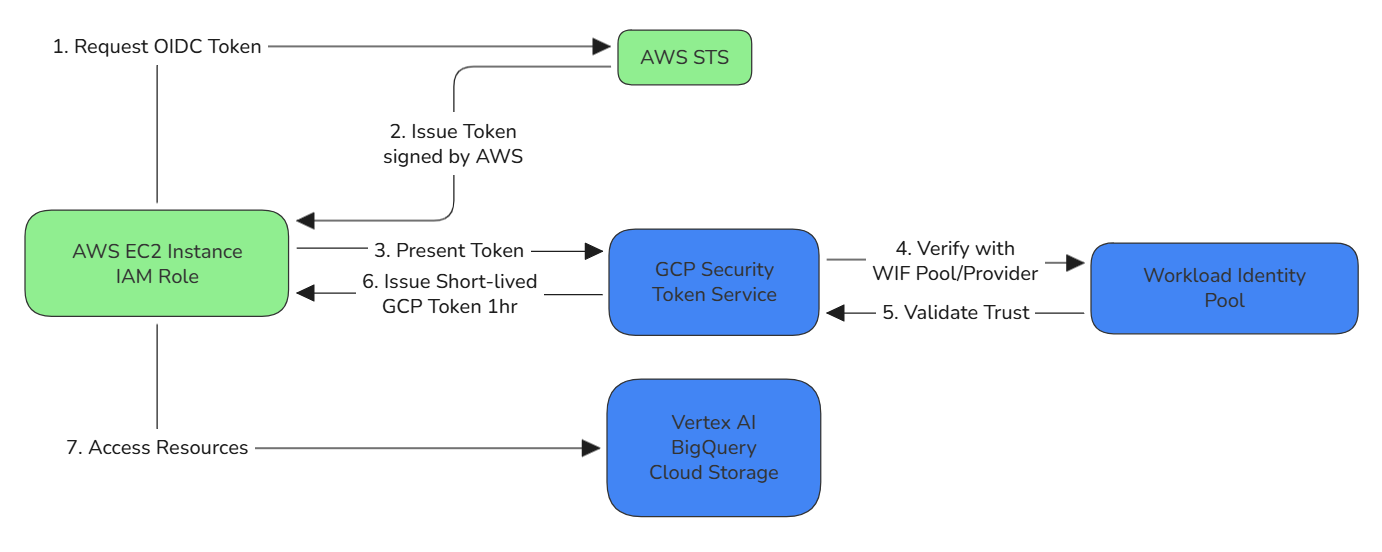
See It In Action
If you're more of a visual learner, the Google Cloud team has an excellent 6-minute walkthrough that demonstrates this exact flow. Watch how seamlessly the token exchange happens—no secrets, no manual rotation, just secure authentication.
Now, let's break down why this matters...
The Zero-Trust Advantage
The shift with WIF is transformative:
Key Security Properties:
- ✔ Ephemeral credentials - Tokens expire automatically in 1 hour (configurable). Even if stolen, they're useless by the time an attacker figures out what they are.
- ✔ No secrets stored - Nothing to leak or rotate. There's literally no JSON file to commit to GitHub.
- ✔ Cryptographic verification - AWS/Azure signs tokens; GCP verifies cryptographically
- ✔ Attribute-based access - Fine-grained control via IAM conditions. You can write policies like "Only allow access if the request comes from this specific AWS role AND this specific production environment."
- ✔ Full audit trail - Every token exchange logged with complete context
Before vs After: The Transformation
| Aspect | Static Keys | Workload Identity Federation |
|---|---|---|
| Credential Lifespan | Forever (until manually revoked) | 1 hour (auto-expires) |
| Storage Locations | 47+ places across clouds | Zero (no secrets to store) |
| Rotation Overhead | 32 hours/year manual work | Automatic (0 hours) |
| If Leaked | Valid until you discover and revoke | Expires in 1 hour anyway |
| Audit Trail | Limited visibility | Every access logged cryptographically |
| Attack Surface | Every storage location is a risk | No stored credentials = no attack surface |
| Compliance | Manual key management documentation | Automated cryptographic audit trail |
| Setup Time | 15 minutes | 30 minutes (one-time) |
| Maintenance | Ongoing quarterly burden | Set it and forget it |
The Business Case: Why This Matters Now
Adopting WIF isn't just "good security hygiene"—it's a business imperative.
Regulatory Pressure is Mounting
If you're in a regulated industry, static keys are a compliance red flag. HIPAA, SOC 2 Type II, and GDPR all demand strict access controls and audit trails. WIF provides a cryptographic paper trail for every single access request, making audits trivial instead of terrifying.
Google's Official Stance
Workload Identity Federation isn't an experimental feature. It's now Google's recommended pattern for all multi-cloud workloads. The ecosystem is moving this way; sticking to static keys is choosing to accumulate technical debt.
Competitive Velocity
Organisations that adopt WIF ship faster. They don't have "key rotation days." They don't have security review bottlenecks for new secrets. They just have automated, secure, invisible authentication that works.
In my implementations, the teams that adopted WIF freed up an average of 60 hours per quarter previously spent on credential management. That's 240 hours per year—6 full engineering weeks—that can be redirected to building features instead of fighting infrastructure.
When WIF Isn't the Answer
For credibility (and because reality is nuanced), let me be clear: Workload Identity Federation isn't always possible.
Scenarios where you still need service account keys:
- Legacy systems without OIDC/SAML support (rare, but exist in older enterprise systems)
- Local development environments (though Application Default Credentials work better here)
- Third-party tools that require static keys (increasingly uncommon as tooling modernises)
- Offline/disconnected systems that can't make real-time token exchanges
For these cases, minimise the 'blast radius': use short-lived keys, strict IAM policies with the principle of least privilege, comprehensive monitoring, and automated rotation. But for 90% of multi-cloud workloads? WIF is the answer.
The Promise: From Strategy to Implementation
The concept makes sense. The business case is undeniable. You eliminate the risk of a $55,000 crypto-mining bill, and you save your engineers hundreds of hours of drudgery.
But how do you actually build it?
How do you configure the AWS IAM roles? How do you map the OIDC tokens? How do you write Terraform? What about troubleshooting when the trust validation fails?
That's exactly what we'll cover in Part 2B.
In the next article, I'll drop the theory and give you the implementation manual. We'll walk through:
- ✔ Step-by-step AWS to Vertex AI implementation (deployable in 15 minutes)
- ✔ Azure to Vertex AI pattern specifically for HIPAA-compliant healthcare workloads
- ✔ Storage Transfer Service pattern for moving multi-TB datasets without bottlenecks
- ✔ Complete troubleshooting guide for when things go wrong (because they will)
- ✔ Terraform code samples ready to adapt for your infrastructure
- ✔ Testing strategies to validate your WIF configuration before production
Ready to eliminate your credential nightmares? Part 2B drops later this week with the complete code and architecture guides.
Key Takeaways
If you remember nothing else from this article, remember this:
- Static service account keys are a security liability that costs you money, time, and sleep
- Workload Identity Federation eliminates secrets entirely through cryptographic trust
- The transformation takes 30 minutes to set up and saves 60+ hours per quarter
- This is Google's recommended pattern for multi-cloud workloads—not an experimental feature
- The implementation details are coming in Part 2B with complete working code
Stop downloading keys. Start trusting identity providers.
Your future self will thank you.
This article is part of the "Enterprise MLOps on GCP" series. Follow me on Medium and LinkedIn for Part 2B and the rest of the series.



Also published on Medium - Join the discussion in the comments!